What hedging is
Say you hold a 0.1 lot buy of EUR/USD. If you now sell 0.1 lot of the same pair and keep both, you hold a buy and a sell at the same time. That is hedging.
In general finance, "hedging" can mean any trade that reduces risk. In retail forex, it usually means this specific setup: opposite positions on the same pair in the same account.
Not every account lets you do this. In some accounts, a sell order simply closes your buy. That depends on whether the account uses netting or hedging.
Netting accounts vs hedging accounts
The MT5 help describes two position accounting systems.[1]
- Netting: "you can have only one common position for a symbol at the same time". A deal in the same direction increases the position. A deal in the opposite direction decreases it, closes it, or reverses it.[1]
- Hedging: "you can have multiple open positions of one and the same symbol, including opposite positions". A new deal opens an additional position and leaves the existing one as it is.[1]
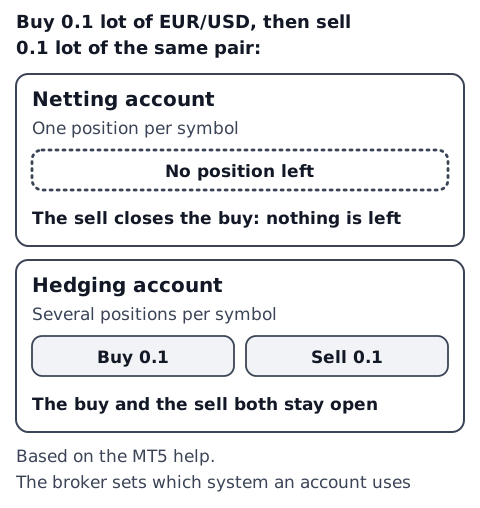
So a hedge can only be held in a hedging account. In a netting account, an opposite order is treated as reducing or closing your current position.
According to the MT5 help, the system in use depends on the account and is set by the broker.[1] According to the MT5 release notes (2016), the position accounting system "is set at an account level and displayed in the terminal window header and the Journal".[5] Screens can differ between versions, so check your broker's documentation too. MT4, mobile apps and other platforms may work differently or use other names.
Closing works differently too. In netting, you close with an opposite deal of the same symbol and volume. In hedging, you pick the position you want to close.[1] Hedging accounts also have a "Close By" operation, which closes two opposite positions of the same symbol together.[3]
Profit and loss while hedged: price moves cancel, costs remain
With equal-size buy and sell positions, a rise in price is a gain on the buy and a loss on the sell. A fall is the reverse. Gains and losses from price moves largely cancel out.
But a buy closes at the Bid and a sell closes at the Ask. The gap between them is the spread (what is the spread). So as soon as you are hedged, you are down by the spread.
Worked example
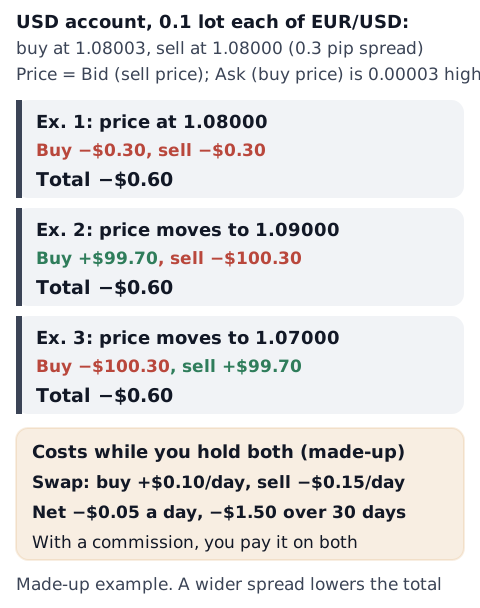
A USD account holds 0.1 lot (10,000 units of EUR) each of EUR/USD: a buy at 1.08003 and a sell at 1.08000. The spread is 0.3 pips (0.00003). "Price" here means the Bid. A buy is opened at the Ask, which is 0.00003 higher, so the buy starts at 1.08003.
When the price moves to 1.09000
Buy: (1.09000 − 1.08003) × 10,000 = +$99.70
Sell: (1.08000 − 1.09003) × 10,000 = −$100.30
Total: −$0.60
At 1.08000 or at 1.07000, the total is still −$0.60. That is 0.3 pips × 0.1 lot × two positions. This assumes you close the two positions separately. The MT5 help says a Close By operation "saves the trader one spread" (−$0.30 in this example).[3] If the spread widens, the total drops further. The idea is the same in a yen, euro or any other account; profit and loss are shown in your account currency.
While you hold both, other costs are added.
- Swap: each position held overnight gets its own swap. In MT5, the swap on open positions is shown in the Swap column of the Trade tab.[3] The swaps on the buy and the sell do not necessarily cancel out. For example, +$0.10 a day on the buy and −$0.15 a day on the sell is a net −$0.05 a day, or −$1.50 over 30 days (made-up numbers). See what is swap for how it works.
- Commission: in an account that charges a commission per trade, you pay it on both positions. When and how it is charged (on entry and exit, daily or monthly) depends on the broker.[3]
These are our example calculations. Spread, swap and commission vary by broker, account and day. See how to count your trading costs.
Margin on hedged positions depends on the broker
The MT5 help calls opposite positions of the same symbol "hedged or covered". There are two ways to calculate margin for them, and "the calculation method is determined by the broker".[2]
- A method where margin is charged for each hedged lot according to the "Hedged margin" value in the symbol's contract specification. The help says that when the initial margin is not specified (0), this field holds a contract size, and if you specify 0, "no margin is charged for the hedged (covered) volume".[2]
- A "calculate using larger leg" method. Margin is calculated for the buy side and the sell side, and the largest value is used as the final margin.[2]
So the margin for a hedge is not necessarily the two positions added together; it depends on the broker's and the symbol's settings. How to open a symbol's specification is in what is a lot, and how margin and margin level work is in margin level explained. The margin calculator shows the margin for a position.
Even if the margin is low, spread, swap and commission slowly reduce your equity. If you close only one side, the remaining position takes the full effect of price moves again. What happens when margin level falls is covered in what is a stop out.
Rules can differ by country and region
Whether you can hold a hedge in one account can depend not only on the broker and account type but also on local rules.
Here is one example, from the United States. NFA (National Futures Association) Rule 2-43(b) says that Forex Dealer Members "may not carry offsetting positions in a customer account but must offset them on a first-in, first-out basis".[4] At the customer's request, a dealer may offset same-size transactions, against the oldest transaction of that size. The closing order and how to count P&L under this rule are covered in the FIFO rule for US forex accounts.
We have not checked the rules in other countries and regions for this article. Treatment differs by country, region and broker, so check your own broker's documentation.
Check it in your own records (you decide)
MT5 history can be shown as a list of positions, orders or deals.[3] In a hedging account, the buy and the sell of a hedge appear as separate positions.
- Result of the whole hedge: add up the profit or loss of both positions.
- Costs: add the swap and commission of both. The Commission column in the deals list shows commission "charged immediately after the execution of a deal".[3]
- Reason: note why you hedged, and when you closed each side.
Result of the hedge = buy P&L + sell P&L + swap on both + commission on both
After logging a few, you can see in your own records how much hedged trades cost and what happened after you closed one side. This article does not decide whether you should hedge.
The pip value calculator turns pips into money, and the swap calculator estimates swap. For the full list of order types, see forex order types. To check whether different pairs add up to the same currency, see holding the same currency in several pairs?
Sources
- MetaQuotes. General Concepts (MetaTrader 5 Help). https://www.metatrader5.com/en/terminal/help/trading/general_concept
- MetaQuotes. Margin Calculation: Retail Forex, Futures (MetaTrader 5 Help). https://www.metatrader5.com/en/terminal/help/trading_advanced/margin_forex
- MetaQuotes. Executing Trades (MetaTrader 5 Help). https://www.metatrader5.com/en/terminal/help/trading/performing_deals
- National Futures Association. Rule 2-43. Forex Orders (NFA Rulebook). https://www.nfa.futures.org/rulebook/rules.aspx?RuleID=RULE%202-43&Section=4
- MetaQuotes. MetaTrader 5 build 1325 release notes (2016). https://www.metatrader5.com/en/releasenotes/terminal/1325