What the five numbers mean
The MT5 help describes the numbers on the trading screen like this.[1]
- Balance: money in the account, not counting the results of open positions
- Equity: balance plus or minus floating profit or loss, commission and so on (roughly "balance + floating profit or loss")
- Margin: money required to cover open positions and pending orders
- Free margin: money you can use to open new positions. Equity − margin
- Margin level: equity as a percentage of margin. Equity ÷ margin × 100
How required margin is calculated
For the calculation mode commonly used for forex in MT5, required margin is calculated like this.[2]
Margin = lots × contract size (units per lot) ÷ leverage
This gives the amount in the pair's base (first) currency (for EUR/USD, euros), converted at the current rate if your account is in another currency. Contract size and leverage differ by broker, account and country rules (see leverage limits).
What moves when a trade goes against you
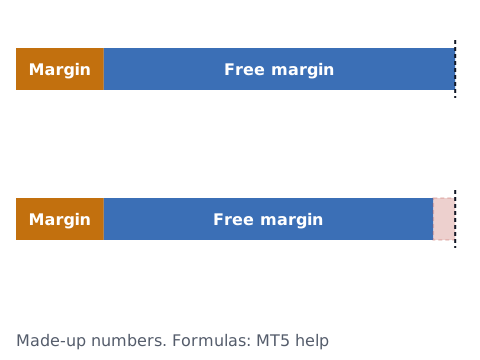
Here is the math for the chart (a worked example):
- Just after the order: equity 10,000, margin 2,000, free margin 8,000, margin level 10,000 ÷ 2,000 × 100 = 500%
- With a −500 floating loss: equity 9,500, free margin 7,500, margin level 9,500 ÷ 2,000 × 100 = 475%
Margin level falls mainly in two situations: when a floating loss grows (equity falls) and when you add positions (margin rises). A bigger lot size makes the same price move a bigger floating loss and also needs more margin, so margin level gets pushed down from both sides.
Margin call and stop out
When margin level falls to a certain point, the broker may warn you (margin call) or close positions for you (stop out). These levels are set for each account, as a percentage or as an amount in the account currency.[3] Levels and how they are applied differ by broker, account and country rules, so check the terms of your own account.
The margin level and stop out calculator shows how far price can move from your current margin level before reaching the stop out level. When price jumps, for example after the market's weekly close, positions may not close where the calculation says (see price gaps).
Check your own records (you decide)
This article does not decide what margin level you should trade at. Logging these helps you see your own patterns:
- Your lot size when you entered, and your margin level at that time
- How lot size and margin level changed on days of losing streaks
- How you felt when margin level dropped (anxious, calm, and so on)
The position size calculator finds a lot size from the amount you are willing to lose on one trade, and the daily loss limit calculator sets a limit for the day.
Sources
- MetaQuotes. Trade (MetaTrader 5 iPhone/iPad Help). https://www.metatrader5.com/en/mobile-trading/iphone/help/trade
- MetaQuotes. Margin: Forex (MetaTrader 5 Help). https://www.metatrader5.com/en/terminal/help/trading_advanced/margin_forex
- MetaQuotes. Account Properties (MQL5 Reference). https://www.mql5.com/en/docs/constants/environment_state/accountinformation