In MT5, you can see your current floating loss and margin level in the Trade tab of the Toolbox.[1] The margin level at which a stop out happens differs by broker, so check your broker's terms.
What is unrealized profit and loss?
Say you buy GBP/USD at 1.2500. If the price is now 1.2400, closing now would give you a loss. That loss you would get by closing now is an unrealized (floating) loss. If the price is 1.2600, it is an unrealized gain.
Because the trade is still open, nothing is final. If the price comes back, the floating loss shrinks; if it keeps going, the loss grows. The same goes for a floating profit: it can shrink or turn into a loss. You will also see it called open profit and loss, or "paper" profit and loss.
Nothing is final until you close
MetaQuotes' official MT5 help describes the account "Balance" as money on the account not including the results of currently open positions.[1] So while a trade is open, your balance does not change, whatever the floating P&L. When you close, the result becomes final and goes into your balance.
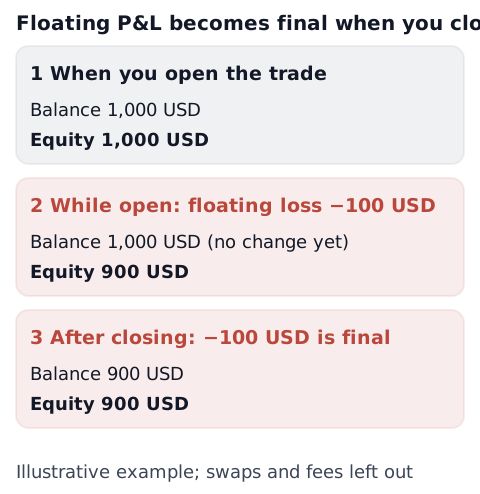
While a trade is open, equity, which includes floating P&L, is closer to what your account is worth right now than the balance is.
Where MT4 and MT5 show it
The first two points describe the desktop versions. The phone apps are covered after them.
- MT5: the list of open positions is in the Trade tab of the Toolbox window.[1] The "Profit" column shows each position's result at the current price.[1] The account line also shows the total result of all open positions.[1]
- MT4: the Trade tab of the Terminal window shows the account's current state and your open positions.[2] The "Profit" column is the result of the trade at the current price.[2]
On a phone: in the MT5 apps for Android and iPhone, open the Trade tab. According to MetaQuotes' mobile help, the top of the Trade tab shows the account's Balance, Equity, Margin, Free Margin and Margin Level, and the list below it shows each open position with its "Profit" at the current price.[6] On Android, the margin fields are highlighted in red if the account gets a margin call.[6]
Labels can differ a little between versions and language settings. The whole screen is covered in how to read a trading platform screen.
How it moves equity and margin level
The official MT5 help gives equity as:[1]
Equity = Balance + Credit − Commission ± Floating profit/loss − Blocked
In the help, "Credit" is credit money the broker has given the trader, and "Blocked" is profit taken during the day that, under some brokers' conditions, cannot be used for trading yet.[1] When both are zero, equity is simply the balance plus or minus floating profit and loss (less any commission).
The same page also says that, depending on the trading conditions set by the broker, equity may count floating profit, floating loss, or both.[1] Check how your own account handles it in your broker's terms.
Margin level is equity ÷ margin × 100.[1] As a floating loss grows and equity falls, margin level falls with it.
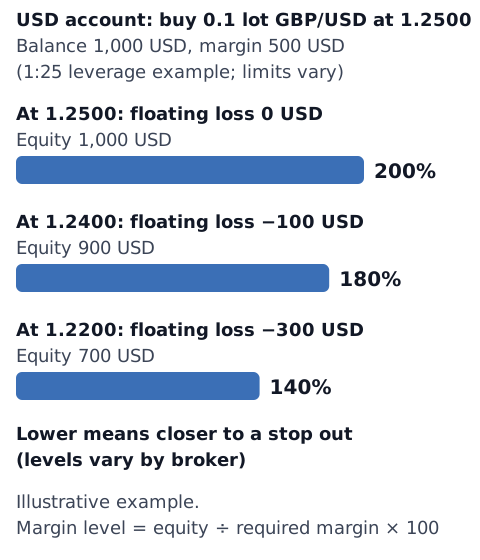
When margin level falls to the levels your broker sets, you may get a warning (a margin call), or positions may be closed automatically (a stop out; in Japan it is often called a "loss cut"). In MT5, the account line turns red when the account is in either state.[1] If a position is closed automatically, its floating loss becomes final at that point. See margin, equity, free margin and margin level, margin call vs stop out and what a stop out is for more.
Worked examples
Both are worked examples for this article, not a suggestion of what size to trade. One lot is taken as 100,000 units (see what is a lot).
- Example 1: US dollar account, buying 0.1 lot of GBP/USD: the size is 0.1 × 100,000 = 10,000 pounds. Bought at 1.2500 with the price now at 1.2400, the floating loss is (1.2400 − 1.2500) × 10,000 = −100 US dollars. With a 1,000 US dollar balance, the balance stays at 1,000 US dollars and equity is 900 US dollars. If the required margin is 500 US dollars (10,000 pounds ÷ 25 = 400 pounds, at 1.2500; a 1:25 leverage example, and limits vary by country and broker), margin level is 900 ÷ 500 × 100 = 180% (the diagram above).
- Example 2: US dollar account, selling 0.05 lot of EUR/USD: the size is 0.05 × 100,000 = 5,000 euros. Sold at 1.0850 with the price now at 1.0820, a short position gains when the price falls, so the floating profit is (1.0850 − 1.0820) × 5,000 = +15 US dollars. With a 1,000 US dollar balance, the balance stays at 1,000 US dollars and equity is 1,015 US dollars. Close it here and the 15 US dollars become final, taking the balance to 1,015 US dollars.
- Example 3: Australian dollar account, buying 0.1 lot of EUR/AUD: the size is 0.1 × 100,000 = 10,000 euros. EUR/AUD is priced in Australian dollars, so the result is already in your account currency. Bought at 1.6500 with the price now at 1.6400, the floating loss is (1.6400 − 1.6500) × 10,000 = −100 Australian dollars. With a 2,000 Australian dollar balance, the balance stays at 2,000 and equity is 1,900. If the required margin is 550 Australian dollars (10,000 euros ÷ 30 = about 333.33 euros, × 1.6500; a 1:30 leverage example, and limits vary by country, broker and pair), margin level is 1,900 ÷ 550 × 100 = about 345%. A pound account trading EUR/GBP works the same way, in pounds.
Spreads, commission and swaps are left out. In examples 1 and 3, the margin can change a little in practice with your broker's calculation and the exchange rate. The idea is the same in an account in pounds, euros, yen or any other currency; the amounts are converted into your account currency. The method is covered in how to calculate forex profit.
Swaps and commission
In MT5, the Trade tab has a "Swap" column separate from "Profit".[1] The MT4 Trade tab also has "Swap" and "Commission" columns.[2] The official MT5 help says that when commission is calculated (daily, monthly and so on) depends on the broker's conditions.[1]
When swaps and commission are charged, and which figure they show up in, differs by broker and account. If you only watch the "Profit" column, the amount that actually reaches your balance can be a little different. Some brokers offer swap-free accounts, which may charge a different fee instead. Swaps are explained in forex swaps (rollover), and counting costs in trading costs per month.
Mental habits while a trade shows a loss
A floating loss is not final yet, so it is easy to feel that "if I wait for it to come back, I have not lost anything". Research has described tendencies like these:
- Prospect theory, a well-known theory of how people choose when the result is uncertain, suggests that people tend to feel a loss more strongly than a gain of the same size, and that when they are already losing, they may be more willing to take risks to avoid taking the loss.[3]
- The tendency to sell winners early and hold on to losers is called the "disposition effect".[4]
- In 10,000 individual accounts at a US brokerage (stocks, 1987–93), a stock trading above its purchase price (a paper gain) was sold at about 1.5 times the rate of one trading below it (a paper loss).[5]
These are studies of stocks and experiments, and may not carry over to forex as they are. In forex, it might show up as closing a small floating profit early, or moving a stop further away as a floating loss gets close to it (examples for this article). See loss aversion and before you move your stop loss for more. When to close a trade is your own decision.
Use the calculators
- Profit or loss from your entry price and the current price: profit and loss calculator
- The value of one pip for a given lot size: pip value calculator
- How many pips are left before the stop out level: margin level and stop out calculator
Sources
- MetaQuotes. Executing Trades - Trading Operations - MetaTrader 5 Help. https://www.metatrader5.com/en/terminal/help/trading/performing_deals
- MetaQuotes. Trade - Terminal - User Interface - MetaTrader 4 Help. https://www.metatrader4.com/en/trading-platform/help/overview/terminal/terminal_trade
- Kahneman, D., & Tversky, A. (1979). Prospect Theory: An Analysis of Decision under Risk. Econometrica, 47(2), 263–291. https://doi.org/10.2307/1914185
- Shefrin, H., & Statman, M. (1985). The Disposition to Sell Winners Too Early and Ride Losers Too Long: Theory and Evidence. The Journal of Finance, 40(3), 777–790. https://doi.org/10.1111/j.1540-6261.1985.tb05002.x
- Odean, T. (1998). Are Investors Reluctant to Realize Their Losses? The Journal of Finance, 53(5), 1775–1798. https://doi.org/10.1111/0022-1082.00072
- MetaQuotes. Trade - MetaTrader 5 for Android Help; Trade - MetaTrader 5 for iPhone/iPad Help. https://www.metatrader5.com/en/mobile-trading/android/help/trade / https://www.metatrader5.com/en/mobile-trading/iphone/help/trade