What is a lot?
Instead of typing an amount of currency such as "10,000 US dollars", many trading platforms ask for the trade size in lots. MT5 is one of them: order volume is entered in lots.
MetaQuotes' official MT5 help describes the contract size in a symbol's specification as the number of units of the commodity, currency or financial asset in one lot.[1] So the amount you actually trade is:
Amount traded = lots × contract size (units in one lot)
For example, buying 0.1 lot of EUR/USD with a contract size of 100,000 is a trade of 0.1 × 100,000 = 10,000 euros.
One lot is not the same everywhere
- 1 lot = 100,000 units: Some brokers that use MT4 or MT5 set one lot of a currency pair at 100,000 units. The margin example in the official MT5 help also uses a contract size of 100,000 for EUR/USD.[2] This size is sometimes called a "standard lot".
- 1 lot = 10,000 units: some brokers and account types use 10,000 units, and others may use other sizes, so always check your own. In Japan, for example, some brokers use 10,000 units, and the exchange-traded market Click 365 trades pairs such as USD/JPY in 10,000 units (some pairs in 100,000).[3]
- Smaller sizes: in an account where one lot is 100,000 units, 0.01 lot is 1,000 units. Some traders call 0.1 lot a "mini" and 0.01 lot a "micro", but these names are not fixed. Thinking in units is safer than relying on the names.
Even at one broker, different account types can use different lot sizes. When someone says they "went in with 0.1 lot", you cannot compare it with your own account unless you know what one lot is in theirs.
Some brokers also offer "cent" accounts, where the balance is shown in cents (a 100 US dollar deposit shows as 10,000). The lot sizes on the screen look the same, but the money behind them is different, so read your broker's account terms as well as the contract size.
Check what one lot is in your account
In MT5, right-click a symbol in the Market Watch window and choose "Specification" to open the symbol's details.[1] The "Contract size" line there is the size of one lot.[1]
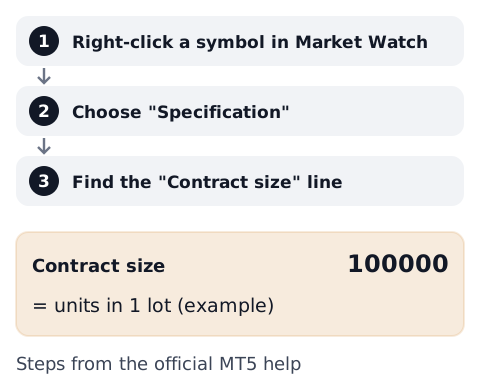
On a phone: in the MT5 apps for Android and iPhone, tap a symbol in the Quotes tab and choose "Properties". According to MetaQuotes' mobile help, the "Contract size" shown there is the number of units in one lot.[4] Labels can differ a little between versions and language settings.
Other trading platforms also show the size of one lot in the symbol details or in the broker's trading terms, sometimes under words such as "contract size", "lot size" or "minimum volume". Reading the screen is covered in how to read a trading platform screen.
Lot size and the value of a pip
The money a one-pip move is worth is "the size of one pip × the amount traded". One pip is usually 0.0001 for most pairs and 0.01 for pairs quoted in yen (see how to calculate forex profit).
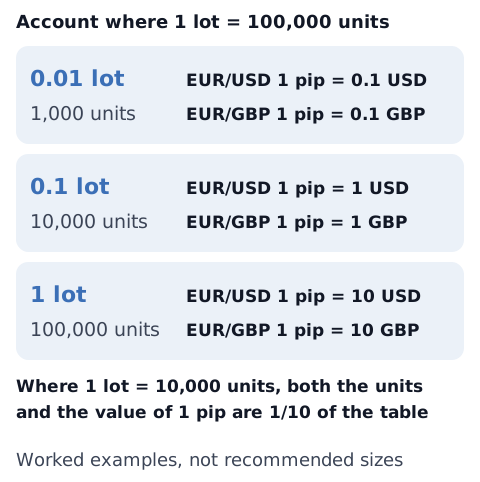
Both examples below are worked examples for this article, not a suggestion of what size to trade.
- Example 1: US dollar account, GBP/USD, 0.1 lot (1 lot = 100,000 units): the amount traded is 0.1 × 100,000 = 10,000 pounds. One pip (0.0001 US dollars) is worth 0.0001 × 10,000 = 1 US dollar, so a 20-pip move is 20 US dollars. If one lot were 10,000 units, the same 0.1 lot would be 1,000 pounds, and one pip would be 0.10 US dollars.
- Example 2: US dollar account, EUR/USD, 0.05 lot (1 lot = 100,000 units): the amount traded is 0.05 × 100,000 = 5,000 euros. One pip (0.0001 US dollars) is worth 0.0001 × 5,000 = 0.50 US dollars, so a 30-pip move is 15 US dollars.
When the profit is in a different currency from your account, as with EUR/USD in a pound or Australian dollar account, or EUR/GBP in a US dollar account, it is converted at the current rate. Spreads and commissions are left out.
Lot size and margin
A bigger lot size also needs more margin. The official MT5 help gives the forex margin as "volume in lots × contract size / leverage".[2] In its example, buying one lot of EUR/USD with a contract size of 100,000 at 1:100 leverage needs 1 × 100,000 / 100 = 1,000 euros.[2] Leverage limits depend on the rules where you live (see forex leverage limits by country).
Gold and other non-currency symbols
For gold, stock indices and similar symbols, one lot is not an amount of currency. Because the contract size is the number of units of "the commodity, currency or financial asset",[1] both the unit and the number differ from symbol to symbol. The same 0.01 lot can be worth a very different amount per price move than on a currency pair. Check the contract size in the specification before trading a new symbol.
Use the calculators
- Lot size from the amount you are willing to lose and your stop distance: position size calculator
- The value of one pip for a given lot size: pip value calculator
- The margin needed for a given lot size and leverage: margin calculator
Set the size of one lot in each calculator to the contract size of your own account. Terms are also explained in the glossary.
Sources
- MetaQuotes. Market Watch - MetaTrader 5 Help. https://www.metatrader5.com/en/terminal/help/trading/market_watch
- MetaQuotes. Margin Calculation: Retail Forex, Futures - MetaTrader 5 Help. https://www.metatrader5.com/en/terminal/help/trading_advanced/margin_forex
- Tokyo Financial Exchange. 商品詳細 (Product details), Click 365 official website [in Japanese]. https://www.click365.jp/about_fx/about_fx02.html
- MetaQuotes. Quotes - MetaTrader 5 for Android Help; Quotes - MetaTrader 5 for iPhone/iPad Help. https://www.metatrader5.com/en/mobile-trading/android/help/quotes / https://www.metatrader5.com/en/mobile-trading/iphone/help/quotes