Home › Tiltnote trading journal
The app
Tiltnote trading journal
Tiltnote is a journal app for recording how you felt on each trade and whether you kept your own rules, so you can look back on them later. It is for people who trade, from beginners to experienced traders. It does not tell you what to trade, make predictions or promise profits.
On an iPhone or a computer, use it in your browser; on Android, use the app from Google Play. You can pay for the paid plan on the web version only in five countries: Japan, the United States, Australia, New Zealand and Singapore. In other countries and regions, you can pay through Google Play in the Android app.
Open in your browser (nothing to install, free)
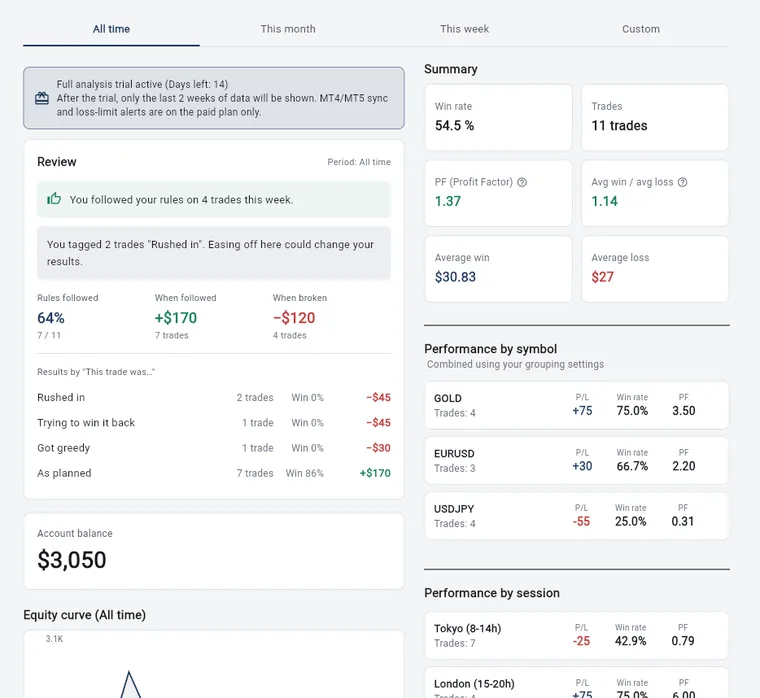
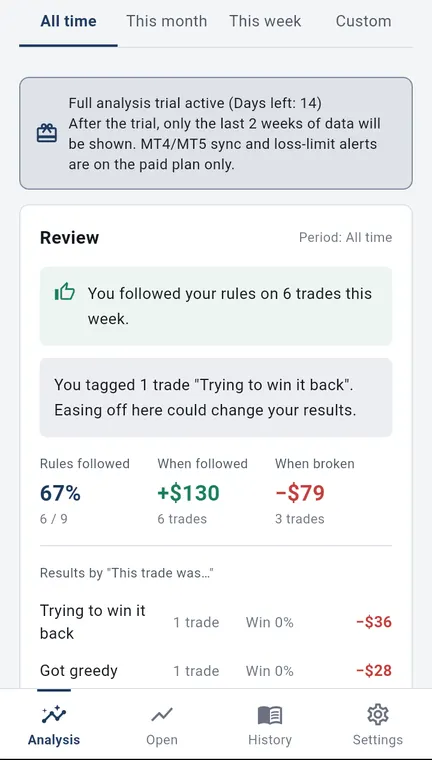
The numbers in the pictures are sample records. They do not show real results or what you will get from using the app. Wide pictures are the web version on a computer; tall pictures are the Android app.
Where you can use it
- Web version: open it in a browser on a computer, an iPhone, an iPad or an Android phone. There is nothing to install. On a wide screen, a menu appears on the left, and analysis and settings are shown in two columns.
- Android app: install it from Google Play. For now, Android is the only installable (native) app. On an iPhone or a computer, please use the web version.
- If you sign in with the same account, your records are the same on both. Whichever one you pay on, the paid plan works on both (see the pricing page).
Free, trial and paid
During the 14-day trial, all of the analysis is available. MT4/MT5 auto-recording and loss-limit alerts are not part of the trial; they are on the paid plan only.
| Free | Trial (first 14 days) | Paid plan | |
|---|---|---|---|
| Logging (by hand, or pasted CSV) | Free, with no end date | Yes | Yes |
| Feelings, rules, strategies, notes and daily notes | Yes | Yes | Yes |
| Analysis, history and calendar | Last 2 weeks | All time | All time |
| Results by strategy and by session | Partly (first strategy only; Tokyo session only) | Yes | Yes |
| MT4/MT5 auto-recording | No | Not included | Yes |
| Loss limits (meter on the analysis screen) | No | Not included | Yes |
| Loss-limit emails | No | Not included | Yes (only while the MT4/MT5 EA is connected) |
| Merge symbol names (grouping) | No | Not included | Yes |
| Editing trades that came in from MT4/MT5 | No | Not included | Yes |
The trial lasts 14 days from when you start using the app. You do not need to enter payment details, and you are not charged automatically.
When the trial ends, your records are not deleted. Logging by hand stays free, and older records become visible again on the paid plan.
Session hours can be changed in Settings to match your own time zone.
What you can do for free
These features work without signing up or paying. Each one has its own page with the details.
- Logging tradesManual entry for closed and open trades, partial closes, pasting CSV text, deposits and withdrawals, and the currency shown.
- Feelings and rulesWhether you followed your rules, “This trade was…”, bad-habit marks, review summaries, and patterns in your numbers.
- AnalysisSummary figures such as win rate, PF and payoff ratio, the equity curve, and results by symbol, session and strategy.
- History and calendarA day-by-day list, filtering by strategy, a profit and loss calendar, daily notes and sharing.
What the paid plan adds
Features you get when you subscribe to the paid plan, and the price (600 JPY a month on the web version). The biggest one is automatic recording from MT4/MT5 on your computer.
- What the paid plan addsMT4/MT5 auto-recording (EA), all-time analysis, switching accounts, merging symbol names, and loss-limit alerts and emails.
- Pricing and versionsFree, trial and paid compared, the price (on the web version, 600 JPY a month or 5,000 JPY a year in Japan; Android prices vary by country), how to cancel, and how the web version and the Android app differ.
Getting started and your account
- You can start right away without entering an email address (“Try without signing up”).
- Later, add an email and password to keep everything you have recorded. Sign in with this account when you switch phones.
- Records made without signing up are not carried over to an account you sign in to later. The app tells you this before you sign in.
- If you forget your password, the app can send a reset email.
- To delete your account, enter your password; your records, deposits and withdrawals, notes, settings and the account itself are all deleted. If you delete it in the latest web version, a paid plan on the web version is automatically set to cancel at the end of the current period (no refund). If the app cannot confirm your subscription, it tells you; in that case, cancel first in Settings > “Manage or cancel paid plan”. Deleting your account does not stop a paid plan on Android (Google Play), so cancel it first under “Subscriptions” in Google Play.
- The app is in Japanese and English (Auto, Japanese or English in Settings). The first time you open the app, it shows a one-time introduction to Tiltnote and the trial.
Other things
- The web version and Android version 2.2.0 or later have no ads. We do not recommend any broker or take referral fees.
- You can read announcements from us in a list inside the app.
- From Settings you can open the free tools and articles on tiltnote.com, contact us by email or LINE, and open the user guide.
- Sharing anonymous usage statistics is optional and off by default. Your email address and the text of your notes are not used. On the web version you can also change your choice for analytics cookies.
What we do not do
- We do not give investment advice, tell you what to trade, or predict future profit or loss. We do not promise profits.
- Trading carries the risk of losing your money. Your trading decisions and results are your own responsibility.
Try it
Open the app (you can start free)
This opens the web version. If you notice a problem, please contact us.
Kenji Okumura, Representative, Tiltnote
Updated 24 Oct 2026 · Run by Kenji Okumura, Representative, Tiltnote · About this site