Home › The app › Reviewing your feelings and rules
The app
Reviewing your feelings and rules
For each trade, record whether you followed your rules and what the trade was like (“This trade was…”, how you felt). The Review section then shows how often you followed your rules and your results by feeling. It only organizes your own numbers; it does not promise better results.
On an iPhone or a computer, use it in your browser; on Android, use the app from Google Play. You can pay for the paid plan on the web version only in five countries: Japan, the United States, Australia, New Zealand and Singapore. In other countries and regions, you can pay through Google Play in the Android app.
Open in your browser (nothing to install, free)
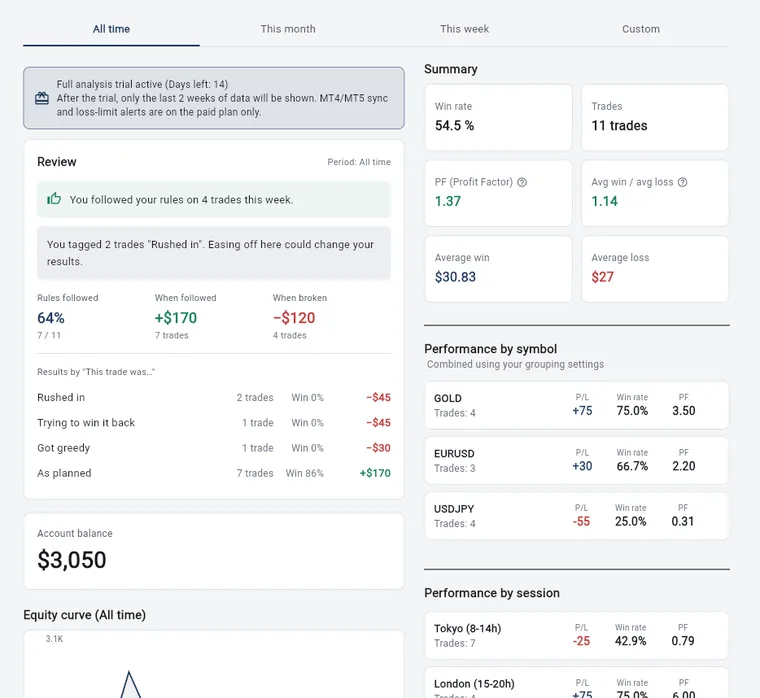
The numbers in the pictures are sample records. They do not show real results or what you will get from using the app. Wide pictures are the web version on a computer; tall pictures are the Android app.
Did you follow your rules?
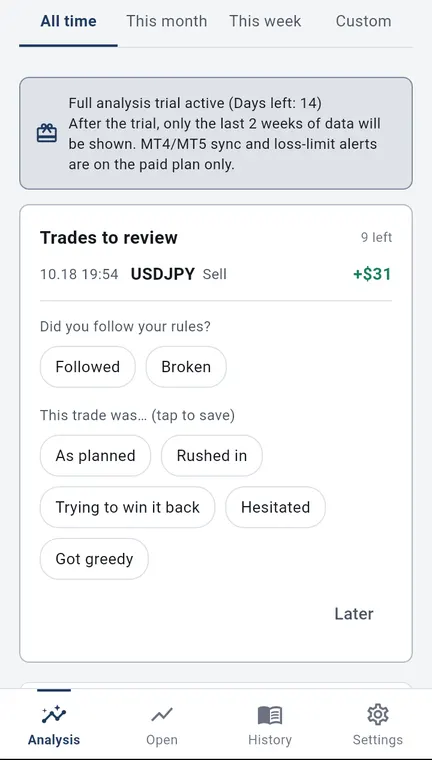
- For each trade, choose “Followed” or “Broken”.
- You can write your rules under “My rule (reminder)” in Settings; it appears at the top of History. You can also write a goal (shown at the top of the analysis screen) and free notes on your entry conditions.
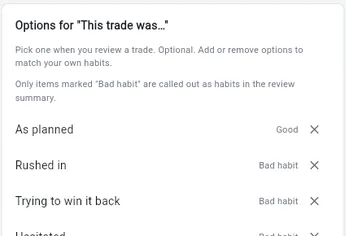
Options for “This trade was…”
- Five options are built in: as planned, rushed in, trying to win it back, hesitated, and got greedy.
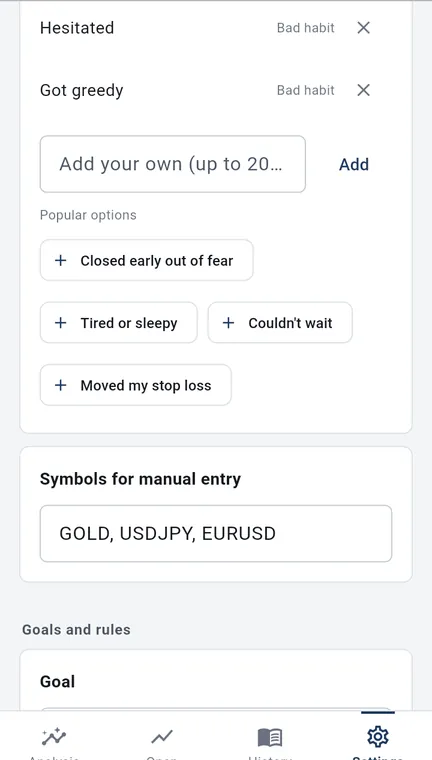
- Four popular options (closed early out of fear, tired or sleepy, couldn’t wait, moved my stop loss) can be added with one tap.
- You can add your own words, up to 20 characters, and remove options you do not need.
- You can mark an option as a “Bad habit”. Only options with this mark are called out as habits in the review summary.
- If a word you add looks like it means the same as an existing option, the app asks whether they are the same.
Strategies and notes
- Register your own strategies and choose one for each trade.
- Add a note to each trade, such as why you entered or how you felt.
- From the words in a note (for example “rushed”), the app suggests options to tag. They are added only when you tap them. It also learns from your past notes, and that learning stays on your device.
Trades you have not reviewed yet
- Closed trades from the last 2 weeks with no feeling or rule set are shown one at a time. Tap to fill them in, or choose to do it later.
Numbers in the Review section
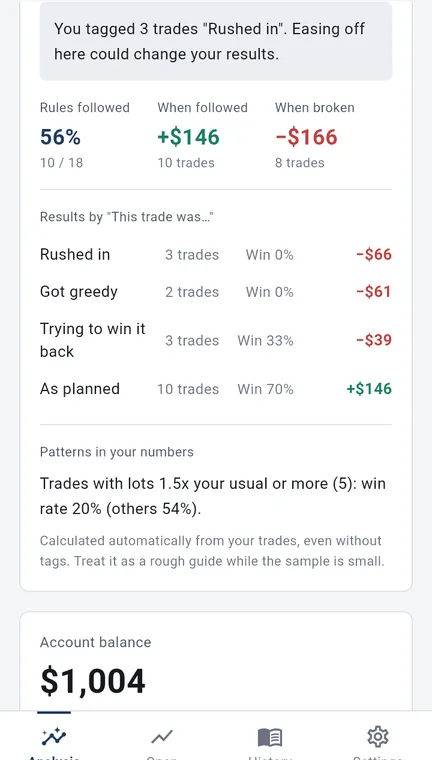
- The share of trades where you followed your rules, with the count.
- Your profit or loss when you followed your rules, and when you broke them.
- The count, win rate and profit or loss for each “This trade was…” option.
- If you set a stats reset date, the review counts from that date.
Review summary and what went well
- The summary names the one habit linked to the largest losses. Choose the tone: Standard, With numbers, or No amounts.
- It also names one thing that went well, such as how many times you followed your rules or that you stayed steady after a loss.
Patterns in your numbers
- This is calculated from your trades automatically, even if you have not tagged any feelings.
- It compares the win rate of trades entered right after a loss, after 2 or more losses in a row, with lots 1.5 times your usual size or more, or sooner than usual, with your other trades.
- A pattern is shown only when you have 10 or more trades, both groups have at least 5, and the pattern is linked to losses (up to 3 patterns are shown at a time). Treat it as a rough guide while you have few trades.
- Your trading pace, which sets what counts as “sooner than usual”, can be Auto, Short, Medium or Long.
On the free plan
On the free plan, the review uses your last 2 weeks of trades (all of them during the first 14 days of the trial). Seeing all time is a paid-plan feature (see What the paid plan adds).
What we do not do
- We do not give investment advice, tell you what to trade, or predict future profit or loss. We do not promise profits.
- Trading carries the risk of losing your money. Your trading decisions and results are your own responsibility.
Try it
Open the app (you can start free)
This opens the web version. If you notice a problem, please contact us.
Kenji Okumura, Representative, Tiltnote
Updated 24 Oct 2026 · Run by Kenji Okumura, Representative, Tiltnote · About this site