Home › The app › What the paid plan adds
The app
What the paid plan adds
There is one paid plan, and you can use these features once you sign up and pay. During the free trial (first 14 days), only the all-time analysis is available; the other features are not included in the trial. For prices and payment, see the pricing page.
On an iPhone or a computer, use it in your browser; on Android, use the app from Google Play. You can pay for the paid plan on the web version only in five countries: Japan, the United States, Australia, New Zealand and Singapore. In other countries and regions, you can pay through Google Play in the Android app.
Open in your browser (nothing to install, free)
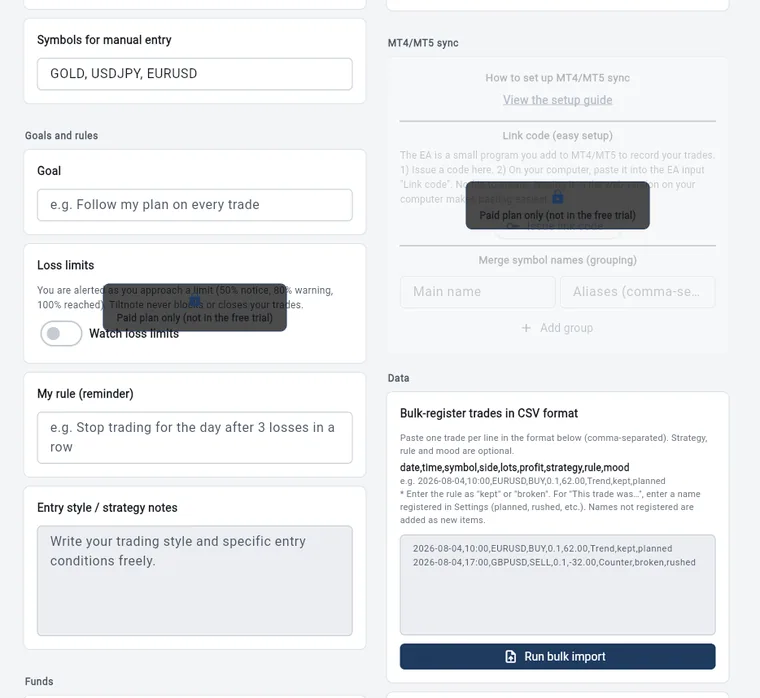
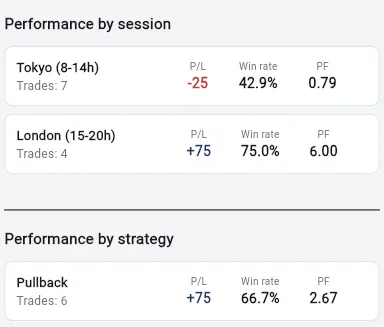
The numbers in the pictures are sample records. They do not show real results or what you will get from using the app. Wide pictures are the web version on a computer; tall pictures are the Android app.
No limit on the period you can analyze
- Analysis, history and the calendar, limited to your last 2 weeks on the free plan, cover all time. Older records are never deleted when the trial ends, so you can see all of them again.
- Results by session show every session, not just Tokyo, and results by strategy show every strategy.
MT4/MT5 auto-recording (pre-release)
- Add the EA (a small program that runs inside MT4/MT5) to MT4/MT5 on your computer and paste in a link code, and your trades are recorded automatically.
- It records opened and closed positions every 5 seconds. Only trades made after you set up the EA are recorded; trades from before that are not imported (you can add past trades by pasting CSV text, free). If a trade made after setup is missed, it goes back up to 7 days to catch up.
- Fees (commissions) from MT4/MT5 are included in profit or loss.
- While the EA is running, the bottom-left corner of the chart shows “Tiltnote watching” and the time of the last check. If it stops, a yellow or red line shows why.
- If you use loss limits and the EA goes silent for more than 30 minutes while you have open positions, we send one email to your registered address. We often cannot tell why it stopped, so we may also send it if you close MT4/MT5 or remove the EA yourself while positions are open (EA versions before 2.22 send it even with no open positions). We don’t send it when you have no open positions, or on weekends. Watching only works while your computer and MT4/MT5 are running.
- You can add rules, feelings, strategies and notes to these trades too. Editing these trades’ details is also available only on the paid plan.
- What you need: MT4 or MT5 running on a Windows computer. The MT4/MT5 phone apps alone are not enough, and trading platforms other than MT4/MT5 are not supported.
- We are still testing it, and we have not yet fully confirmed that it always works on real accounts. If something looks wrong, please contact us.
How to connect
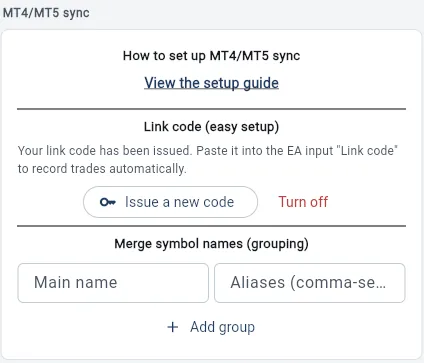
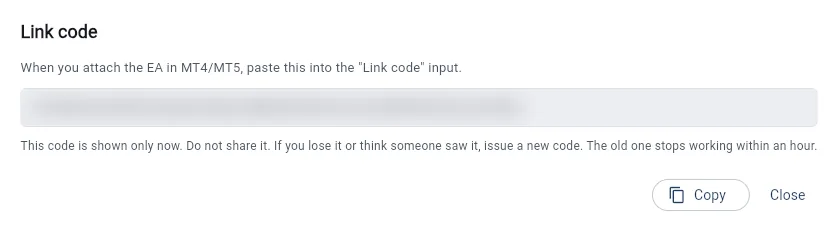
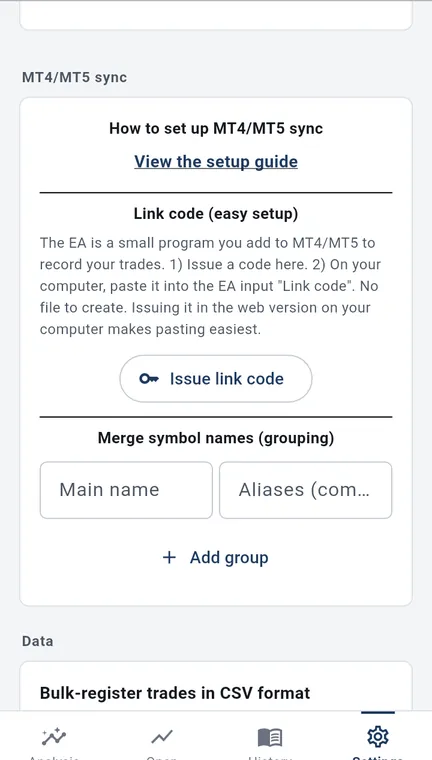
- 1. In the app, go to “MT4/MT5 sync” in Settings and issue a link code. Issuing it in the web version on your computer makes pasting easiest.
- 2. In MT4/MT5 on your computer, paste the code into the EA input “Link code”.
- In MT4/MT5 settings, you add four addresses (sync.tiltnote.com and three Google addresses) to the WebRequest allowed URL list. There is no file to create and no password to enter. The setup guide has the full steps and the four addresses (step 1 is downloading the EA). Anyone can read the guide.
- You can issue a new code or turn the code off. The old code stops working within an hour.
Switching accounts
- If auto-recording connects two or more MT4/MT5 accounts, switch at the top of the screen between all accounts, by currency, or one account at a time.
- You can set a starting balance for each account.
Merge symbol names (grouping)
- Combine symbols that brokers name differently (for example GOLD and XAUUSD) into one in your results. You find it under “MT4/MT5 sync” in Settings.
Loss limits
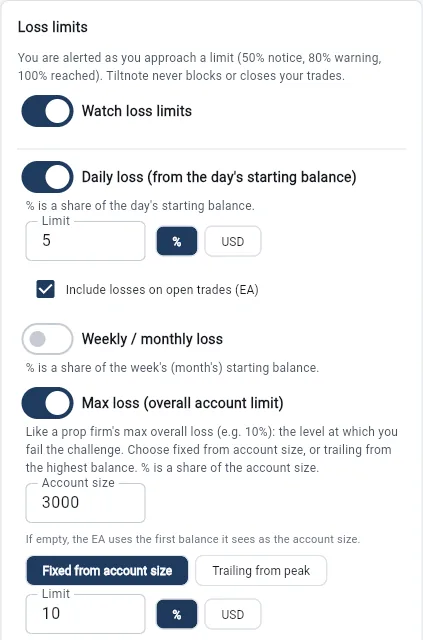
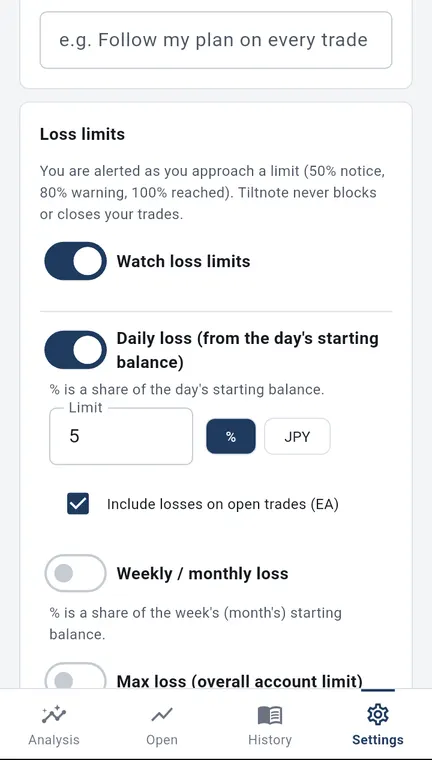
- When you get close to a loss limit you set yourself, the app tells you with colors and words. The app never stops your trading; it only lets you know.
- Daily loss: your loss measured from the balance at the start of the day.
- Weekly or monthly loss: your loss measured from the balance at the start of the week (or month).
- Maximum loss: a limit on the whole account. Choose whether it is fixed from your account size or trails your highest balance (like a prop firm’s overall loss limit).
- Losing streak: choose from 2 to 10 losses in a row. Except for the losing streak, set each limit as an amount or a percentage.
- Choose the hour your day starts, from 0 to 23. Prop firms differ, so please check your own firm’s rules.
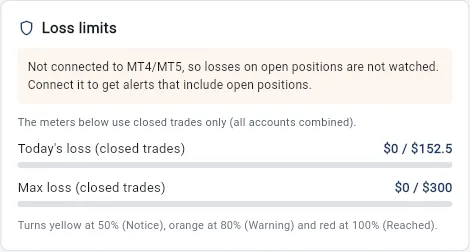
- A meter on the analysis screen turns yellow at 50% (caution), orange at 80% (warning) and red at 100% (reached), with both colors and words. The meter in the app uses closed trades only.
- You can set separate limits for each MT4/MT5 account. Accounts without their own limits use the shared one.
Alerts and emails while the EA is connected
- The EA also tracks unrealized losses in real time and alerts you on the MT screen. If you turn on notifications in MT’s settings, you also get a phone notification. A box with the EA’s alert also appears at the top of the analysis screen in the app.
- At 80% and 100%, the app also emails the address you signed up with. Emails go only to a verified address, at most once for each limit, period and stage, and no more than 10 a day. You can turn them off in Settings.
- Emails are sent only while the EA is connected. If you log trades only by hand or by pasting CSV text, you get the meter on the analysis screen, but no emails.
Please note
- Loss-limit calculations may differ from official ones, such as a prop firm’s. Check your firm’s own screens for the official numbers.
- Alerts do not stop your trading.
What we do not do
- We do not give investment advice, tell you what to trade, or predict future profit or loss. We do not promise profits.
- Trading carries the risk of losing your money. Your trading decisions and results are your own responsibility.
Try it
Open the app (you can start free)
This opens the web version. If you notice a problem, please contact us.
Kenji Okumura, Representative, Tiltnote
Updated 24 Oct 2026 · Run by Kenji Okumura, Representative, Tiltnote · About this site