Home › The app › Analysis (numbers and charts)
The app
Analysis (numbers and charts)
From the trades you record, the app shows figures such as your win rate, and charts. It only organizes your own recorded numbers. They are not trading advice.
On an iPhone or a computer, use it in your browser; on Android, use the app from Google Play. You can pay for the paid plan on the web version only in five countries: Japan, the United States, Australia, New Zealand and Singapore. In other countries and regions, you can pay through Google Play in the Android app.
Open in your browser (nothing to install, free)
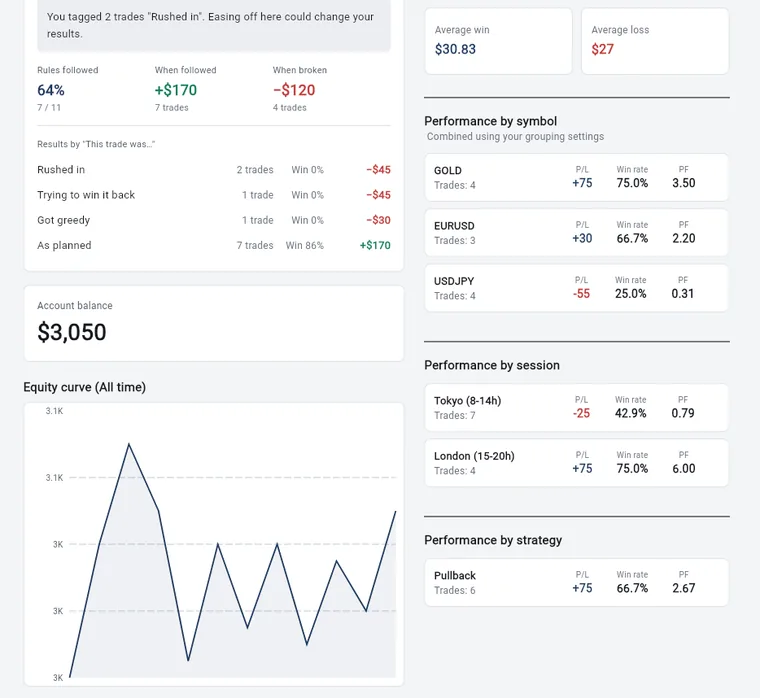
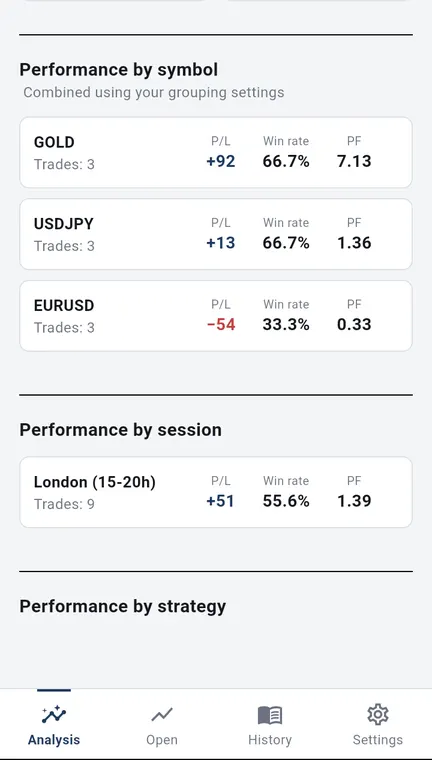
The numbers in the pictures are sample records. They do not show real results or what you will get from using the app. Wide pictures are the web version on a computer; tall pictures are the Android app.
Period
- Choose All time, This month, This week or Custom.
Summary
- Account balance (or the net profit for the period, when you choose one).
- Win rate, number of trades, PF (profit factor: total profit divided by total loss), Avg win / avg loss (the payoff ratio: average win ÷ average loss), average win and average loss.
- Tap “?” next to PF or Avg win / avg loss to see an explanation.
Equity curve
- See how your balance moved over the period as a line. Tap a point to see the amount.
Results by symbol
- The count, profit or loss, win rate and PF for each symbol.
Results by session
- Trades are split into Tokyo, London, New York and other hours, with the count, profit or loss, win rate and PF for each.
- Each trade is counted in the session in which it was opened.
- You can change the hours of each session under “Market hours” in Settings, to match your own time zone.
Results by strategy
- The count, profit or loss, win rate and PF for each strategy. Tap one to see its trades in History.
Stats reset date
- If you set a reset date, the review (rules and feelings) counts from that date.
What the free plan shows
All-time analysis and merging symbol names are paid-plan features (see What the paid plan adds).
- On the free plan, analysis, history and the calendar show your last 2 weeks of trades.
- Results by session show the Tokyo session only, and results by strategy show your first strategy only.
- Older records are kept. During the trial (first 14 days) you can see everything.
- You can switch between MT4/MT5 accounts (when you have two or more) at the top of the screen. MT4/MT5 accounts are connected when you use auto-recording on the paid plan.
What we do not do
- We do not give investment advice, tell you what to trade, or predict future profit or loss. We do not promise profits.
- Trading carries the risk of losing your money. Your trading decisions and results are your own responsibility.
Try it
Open the app (you can start free)
This opens the web version. If you notice a problem, please contact us.
Kenji Okumura, Representative, Tiltnote
Updated 24 Oct 2026 · Run by Kenji Okumura, Representative, Tiltnote · About this site