If you see "margin call" right now
- Your positions are still open: a margin call itself is a warning and does not close positions (our own explanation). In MT5, the account line turns red when the account is in the margin call or stop out state, and at stop out the position with the largest loss is closed first.[1] If you use another platform, check your broker's documents for what its words mean.
- Look at your margin level: it is in your trading platform's account numbers (how to read a trading platform screen).
- Look up your broker's stop out level: the margin level at which positions are closed automatically is in your broker's documents.
Because of how margin level is calculated, the two things you can do to raise it are adding funds or reducing positions (see "What is the difference?" below). If you do nothing, it stays, falls further or recovers depending on price moves. This article does not tell you which to do; that is your decision.
Two levels
This is how we explain the two levels. Your broker sets the numbers.
- Margin call level: below this level, the account is in the margin call state. It is a warning, and positions stay open (our own explanation). Guidance from the UK FCA also lists making a margin call separately from closing a client's positions.[2]
- Stop out level: below this level, positions are closed automatically. The MT5 help says that at stop out, in the normal mode (when FIFO closing is off), the position with the largest loss is closed first.[1] Whether all or only some positions are closed, and in what order, can depend on your broker's conditions.
In MT5, the account line in the Toolbox turns red when the account is in either state.[1] The color alone does not tell you which state it is, so also look at the margin level number.
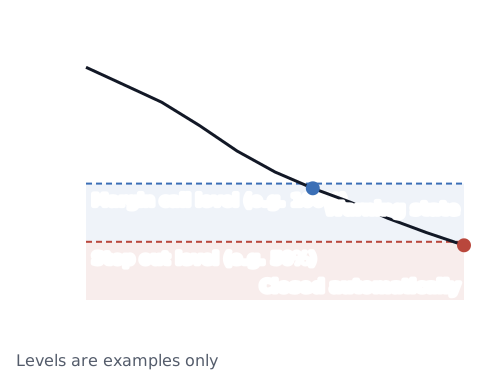
What is the difference?
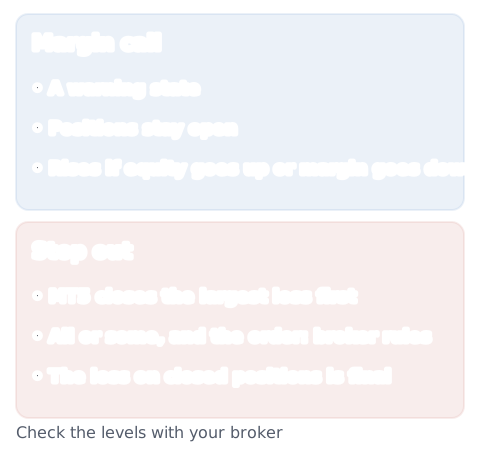
- Margin call: a warning state. Your positions are still open, so the margin level may still recover.
- Stop out: positions are closed automatically. Once a position is closed, its loss is final.
Margin level is equity ÷ margin × 100.[1] For example, with equity (your balance plus or minus open profit or loss) of 1,000 and required margin of 400, the margin level is 1,000 ÷ 400 × 100 = 250%. So to raise it, you either add funds to increase equity or reduce positions to lower the margin needed. The terms are explained in margin, equity, free margin and margin level.
Who sets the levels?
The numbers depend on your broker and on the rules where you live.
- United Kingdom: the Financial Conduct Authority (FCA) rules require firms to make sure a retail client's net equity (roughly, the equity in the account) does not fall below 50% of the margin required.[2] Guidance in the same section (COBS 22.5.16G) lists making a margin call separately from closing a client's positions.[2] If a UK firm goes out of business and cannot return your money, the Financial Services Compensation Scheme (FSCS) can pay up to £85,000 per person, per firm, for covered investments; it does not pay for losses from price moves.[8] If you have a complaint about a stop out, complain to the broker first; you can then take it to the Financial Ombudsman Service (FOS) for free.[9]
- European Union: a 2018 decision by the European Securities and Markets Authority (ESMA) set out that positions are closed when a client's funds fall below half of the required margin.[3] That was a temporary measure; between 2019 and 2020, national regulators in the EU replaced it with their own rules, one by one.[5]
- Australia: from March 29, 2021, an order by the Australian Securities and Investments Commission (ASIC) standardizes margin close-out arrangements. These are rules that make the broker close one or more of a retail client's CFD positions before all or most of the client's money is lost.[6] The level is set at 50%: if the account's net equity falls below 50% of the total initial margin for the open positions, the broker must close one or more positions as soon as market conditions allow. The order does not apply to professional, sophisticated or other wholesale clients.[7] ASIC says firms covered by its dispute resolution rules must be members of the Australian Financial Complaints Authority (AFCA), and that AFCA can handle complaints that the firm could not resolve internally.[10] Check whether the firm is an AFCA member before you rely on it.
- Japan: the Financial Futures Association of Japan's rules say a firm must start the stop out (called "loss cut" in Japan) right away when funds fall below the required margin times the stop out level the firm sets.[4]
These are only four examples. Rules in other countries and regions can be different, and some places may have no fixed level, so check with your broker and your local regulator.
Some brokers also use other words, such as a request for additional margin. What each word means and what you need to do by when depends on the broker, so check your broker's documents. How stop outs work and how rules differ by region is covered in what is a stop out.
Things to check yourself
- Both levels: the margin level at which your broker issues a margin call and a stop out
- How you are told: app notifications, email and so on
- Your current margin level: shown in your trading platform's account numbers (how to read a trading platform screen)
To see how many pips your open position is from the stop out level, use the margin level and stop out calculator.
Sources
- MetaQuotes. Executing Trades - Trading Operations - MetaTrader 5 Help. https://www.metatrader5.com/en/terminal/help/trading/performing_deals
- Financial Conduct Authority. FCA Handbook, COBS 22.5.13R and 22.5.16G (from August 1, 2019). https://handbook.fca.org.uk/handbook/cobs22/cobs22s5
- European Securities and Markets Authority. (2018). Notice of ESMA's Product Intervention Decisions in relation to contracts for differences and binary options (ESMA35-43-1135, decision of May 22, 2018). https://www.esma.europa.eu/sites/default/files/library/esma35-43-1135_notice_of_pi_decisions_on_cfds_and_binary_options.pdf
- The Financial Futures Association of Japan. (Established January 26, 2011; amended June 17, 2020, in force from December 1, 2020). 金融先物取引業務取扱規則第25条の3に関する細則 (Detailed rules on stop out transactions in retail forex margin trading) [in Japanese]. https://www.ffaj.or.jp/wp-content/uploads/2019/06/ffaj-gyotori25_3-saisoku-20200617.pdf
- European Securities and Markets Authority (ESMA). Product intervention. https://www.esma.europa.eu/investor-corner/product-intervention
- Australian Securities and Investments Commission. (October 2020). 20-254MR ASIC product intervention order strengthens CFD protections. https://www.asic.gov.au/about-asic/news-centre/find-a-media-release/2020-releases/20-254mr-asic-product-intervention-order-strengthens-cfd-protections
- Australian Securities and Investments Commission. (2020). Explanatory Statement, ASIC Corporations (Product Intervention Order—Contracts for Difference) Instrument 2020/986 (registered October 23, 2020). Federal Register of Legislation. https://legislation.gov.au/F2020L01338/asmade/2020-10-23/es/original/pdf
- Financial Services Compensation Scheme (FSCS). Investments. https://www.fscs.org.uk/what-we-cover/investments/
- Financial Ombudsman Service. How to complain. https://www.financial-ombudsman.org.uk/consumers/how-to-complain
- Australian Securities and Investments Commission. Dispute resolution. https://asic.gov.au/regulatory-resources/financial-services/dispute-resolution/