Order types at a glance
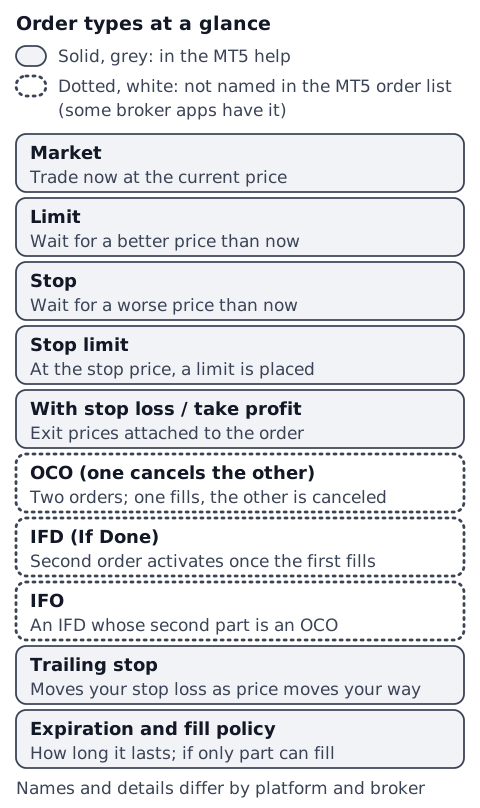
Below, each one gets a short note on what it does, when it is used (as an example), and what to watch for. The examples show common uses; they are not recommendations.
How the price is set
Market order
- What it does: buys or sells now at the current price, without setting a price.[3]
- Used when (example): you want to get in or out right away.
- Watch for: the fill can differ from the price you saw (see what is slippage).
Limit order
- What it does: waits for a better price than now: below the current price to buy, above it to sell.[1] The MT5 help says it fills at your price or better.[2]
- Used when (example): you want to buy if price dips, or to set a take-profit level.
- Watch for: if price never reaches it, it does not fill.
Stop order
- What it does: waits for a worse price than now: above the current price to buy, below it to sell.[1]
- Used when (example): for a stop-loss, or to get in if price breaks out one way.
- Watch for: it fills at your price or worse.[2] If price jumps, for example after the weekend, the difference can be large (see price gaps).
Where to place Buy Limit, Sell Limit, Buy Stop and Sell Stop is shown in limit vs stop orders.
Stop limit order
- What it does: when price reaches the stop price, a limit order is placed at a price you set. The MT5 help says it is used when a trader wants a stop order but wants to limit the slippage.[2]
- Watch for: once triggered it is a limit order, so if price moves past your limit, it may not fill. FINRA, the US securities industry's self-regulatory organization, describes the same mechanism for stocks: a stop limit order becomes a limit order when the stop price is reached.[4]
Linked orders
Orders with a stop loss and take profit
- What it does: you set the stop loss and take profit prices at the same time as the order that opens the trade. The MT5 order window has fields for both.[2]
- Watch for: a stop loss is a stop order, so it can close at a worse price than you set. The stop-loss and take-profit calculator finds the prices.
OCO (one cancels the other)
- What it does: you place two orders at once; when one fills, the other is canceled automatically. OCO stands for "one cancels the other". Japan's Financial Futures Association, for example, explains it this way.[3]
- Used when (example): to hold both a take-profit limit and a stop-loss stop on an open position.
IFD (If Done)
- What it does: you place an entry order and an exit order at the same time.[3] Once the first (entry) fills, the second (exit) becomes active.
- Used when (example): you cannot watch the market all the time. The association gives this as an example.[3]
IFO (IFD plus OCO, also called IFDOCO)
- What it does: combines IFD and OCO.[3] When the entry order fills, two exit orders (take profit and stop loss) become active, and when one of them fills, the other is canceled.
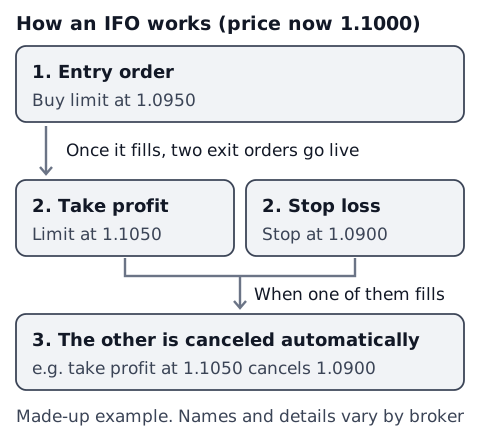
In each case, if the exit is a stop loss (a stop order), it can fill worse than the price you set.
The names IFD and IFO are the ones used in the explanation by Japan's association above. On other platforms, similar setups may go by other names, or have no name at all, so check your platform's help for what it calls them.
A stop that moves: the trailing stop
- What it does: as price moves in your favor, it moves your stop loss along with it. The MT5 help describes it as automating what you would otherwise do by moving the stop loss by hand.[1]
- Watch for (MT5): the MT5 help says a trailing stop runs in the trading platform rather than on the server, unlike stop loss and take profit, so it does not work if the platform is off.[1] It may not be available on mobile versions or other platforms, and broker apps may work differently.
For things to think about before moving a stop, see moving your stop loss.
Order conditions: expiration and fill policy
Expiration
In MT5, pending orders (limits, stops and other orders that wait until price reaches a level you set) can have these expiration settings:[2]
- GTC (Good Till Canceled): stays until you remove it.
- Today: valid only during the current trading day.
- Specified: valid until a date and time you set.
- Expiration date: valid until 00:00 on the day you set.
The names on the screen can differ by broker and platform, and broker apps may offer different options.
Fill policy (FOK, IOC and more)
As a beginner, you can leave this for later. These rules decide how an order is handled depending on whether it can be filled right away, and in full. The MT5 help describes them like this:[1]
- FOK (Fill or Kill): fills only in the full amount. If that amount is not available, the order is not executed.
- IOC (Immediate or Cancel): fills as much as is available, and the rest is canceled.
- BOC (Book or Cancel): the order can only be placed in the order book (Depth of Market). If it could be filled right away when placed, it is canceled. Only for limit and stop limit orders.
- Return: if partly filled, the remaining amount is not canceled and keeps being processed.
Which ones you can choose depends on things like your account's execution type.[1]
MT4 and MT5 orders versus broker apps
The MT5 help lists market orders and the pending orders Buy Limit, Sell Limit, Buy Stop, Sell Stop, Buy Stop Limit and Sell Stop Limit, to which you can add a stop loss, a take profit and a trailing stop.[1] The names OCO, IFD and IFO do not appear in that list.
In MT5, a pending order with a stop loss and take profit attached looks similar to an IFD or IFO. Still, the names and the details are not necessarily the same.
OCO, IFD and IFO are names you may see in trading apps that brokers build themselves. Even with the same name, the combinations and behavior can differ between brokers. MT4 and mobile apps may also offer different orders from MT5 for desktop. Check your own platform's or broker's help before you use them.
To see whether your platform has them, look for "OCO", "IFD" or "IFO" in the order window of your broker's app. If they are not there, in MT5 you can do something close by attaching a stop loss and take profit to a pending order.
Check your own records (you decide)
This article does not decide which order to use. To review how you use orders, log these so you can look back later:
- Which order you entered with (market, limit, stop, IFD and so on)
- Which order closed the trade (take profit, stop loss, manual close or trailing stop)
- The price you set and the price you actually got
The position size calculator finds the lot size, and the stop-loss and take-profit calculator finds your exit prices. Terms are also explained in the forex glossary.
Sources
- MetaQuotes. General Concepts (MetaTrader 5 Help). https://www.metatrader5.com/en/terminal/help/trading/general_concept
- MetaQuotes. Executing Trades (MetaTrader 5 Help). https://www.metatrader5.com/en/terminal/help/trading/performing_deals
- Financial Futures Association of Japan. 取引スキーム [Trading scheme] (in Japanese). FFAJ Learning FX. https://www.ffaj.or.jp/learning/?p=13
- FINRA. (2016). Regulatory Notice 16-19: FINRA Issues Guidance Regarding the Use of Stop Orders During Volatile Market Conditions. https://www.finra.org/rules-guidance/notices/16-19