What slippage is
Prices keep moving, even in the short time between sending an order and getting filled. If price moves in that time, the fill can differ from the price you saw when you ordered. That difference is slippage.
The MT5 help uses the same word: it says that if the market moves the other way, a stop order "will be filled with a slippage".[1]
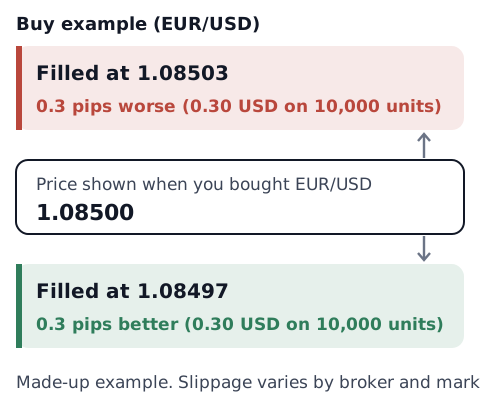
Worked example: 0.3 pips on EUR/USD
On EUR/USD, 1 pip is usually 0.0001 US dollars, so 0.3 pips is 0.00003 US dollars.
Cost of the slippage = price difference × units traded
0.00003 USD × 10,000 units = 0.30 USD
- 0.1 lot (account where 1 lot = 100,000 units): 10,000 units, so 0.30 USD.
- 1 lot (same account): 100,000 units, so 3 USD.
- 0.1 lot (account where 1 lot = 10,000 units): 1,000 units, so 0.03 USD.
These are our example calculations. The size of one lot depends on the broker and account (what is a lot). In an account in another currency, the amount is converted at the current rate. Each difference may be small, but over many trades the total can add up. See how to count your trading costs.
Slippage can go either way
Slippage does not always cost you. If price moves your way after you send an order, you can be filled at a better price.
The European Securities and Markets Authority (ESMA) wrote about this in a 2016 Q&A. It looks at price moves between the time a client places an order and the time the hedge is made by the liquidity provider. If the firm keeps the gains from favorable moves but passes all or part of the losses from unfavorable moves on to clients, ESMA calls this "asymmetric price slippage". It gives this as an example of a firm not taking all reasonable steps to avoid conflicts of interest.[2] In the UK, a 2014 Financial Conduct Authority (FCA) review of best execution described the same practice, where a firm passes price moves against the client on to the client but keeps moves in the client's favor, and gave examples of firms that did not seek to benefit from slippage against a client.[3] That Q&A is aimed at regulators and firms, and rules differ by country and region.
When slippage is more likely
- Fast markets: FINRA, the US securities industry's self-regulatory organization, says that a stop order becomes a market order once the stop price is reached, and that the fill may be at a significantly different price if the market is moving rapidly.[4] It is written about stocks, but the mechanism is similar.
- Around data releases: price can move sharply right after a release, which makes it a fast market. Research on orders pulling back and spreads widening just before major releases is covered in what is the spread.
- Right after the market opens: when the market reopens at the start of the week, price can start away from where it closed (a gap). If a gap jumps past your stop, the slippage can be especially large (price gaps). FINRA also notes that markets may be more volatile around the open and close.[4]
- Stressed markets: a central bank report that spreads widened sharply and trading volumes fell during a period of market stress is covered in what is the spread.
How much slippage you get depends on market conditions and on how your broker and account execute orders.
How order types relate to slippage
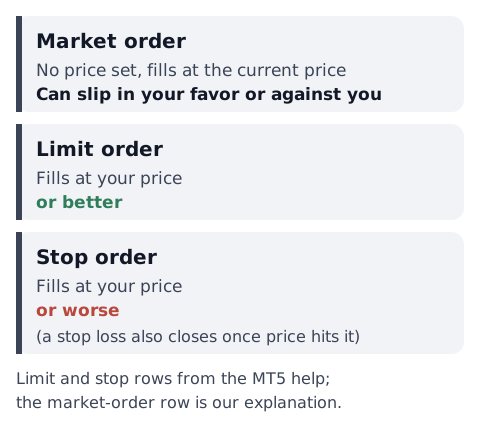
- Market order: buys or sells at the current price, without setting a price. MT5 has four execution types: Instant, Request, Market and Exchange execution.[5] In Market Execution, "a broker makes a decision about the order execution price".[1] The fill can differ from the price you saw.
- Limit order: the MT5 help says it is executed at "the specified one or better than that", and so "no slippage occurs during order execution".[1] The trade-off is that it does not fill unless price reaches it.
- Stop order: executed at "the specified one or worse than that".[1] A stop-loss also fills once price reaches it, so it can fill worse than where you set it.
Where to place the four pending orders is shown in limit vs stop orders.
The Deviation field in MT5
According to the MT5 help, when your account uses Instant Execution, the order window has a "Deviation" field. Deviation is "the difference between the order execution price and the specified price to which a trader agrees". If the price changes by more than that amount while the order is processed, the dealer (server) can refuse the order and offer new prices, which is called a requote.[1] A requote means the broker does not accept the requested price and returns prices at which the order can be executed.[5] In other words, the field sets how much slippage you are willing to accept.
The help's description of Market Execution does not mention this field.[1] Check your order window or your broker's documentation to see which execution type your account uses. Other platforms, including MT4 and mobile apps, may name or place this setting differently, or not have it.
Check your own slippage (you decide)
In MT5 for desktop, your account history is in the Toolbox window.[6] It can be shown as positions, orders or deals. In the deals list, "Price" is the "price at which the deal was executed", and "Order" is the ticket of the order the deal came from.[1] With these two columns, you can line up each order with its fill.
On a phone: in the MT5 apps for Android and iPhone, open the History tab and choose Deals at the top. According to MetaQuotes' mobile help, only brief information is shown at first; tap a deal once to see more, including "Price", the price the deal was executed at.[7] Labels can differ a little between versions and language settings.
- Limit, stop and stop-loss orders: compare the price you set with the deal's Price
- Market orders: note the price you saw when you clicked, and compare it with the deal's Price
For stop-losses and market orders, you may not be able to compare later unless you write down the price you saw or set at the time.
Slippage (pips) = (fill price − order price) ÷ size of 1 pip
Buy: positive is worse, negative is better / Sell: negative is worse, positive is better
For example, a EUR/USD buy with an order price of 1.08500 and a fill at 1.08503 gives (1.08503 − 1.08500) ÷ 0.0001 = 0.3 pips against you. After logging a number of trades, you can see in your own records when and where slippage was larger. This article does not decide which orders to use or when to trade.
The pip value calculator turns pips into money, and the stop-loss and take-profit calculator finds your exit prices. To export your history, see exporting MT4 and MT5 trade history.
Sources
- MetaQuotes. Executing Trades (MetaTrader 5 Help). https://www.metatrader5.com/en/terminal/help/trading/performing_deals
- European Securities and Markets Authority. (2016). Questions and Answers: Relating to the provision of CFDs and other speculative products to retail investors under MiFID (ESMA/2016/904). https://www.esma.europa.eu/sites/default/files/library/2016-904_qa_on_cfds_other_speculative_products.pdf
- Financial Conduct Authority. (July 2014). TR14/13: Best execution and payment for order flow (p. 19). https://www.fca.org.uk/publication/thematic-reviews/tr14-13.pdf
- FINRA. (2016). Regulatory Notice 16-19: FINRA Issues Guidance Regarding the Use of Stop Orders During Volatile Market Conditions. https://www.finra.org/rules-guidance/notices/16-19
- MetaQuotes. General Concepts (MetaTrader 5 Help). https://www.metatrader5.com/en/terminal/help/trading/general_concept
- MetaQuotes. Interface (MetaTrader 5 Help). https://www.metatrader5.com/en/terminal/help/startworking/interface
- MetaQuotes. History - MetaTrader 5 for Android Help; History - MetaTrader 5 for iPhone/iPad Help. https://www.metatrader5.com/en/mobile-trading/android/help/history / https://www.metatrader5.com/en/mobile-trading/iphone/help/history