How %K and %D are calculated
The MT5 help calculates the stochastic like this.[1]
%K = (latest close − recent lowest low) ÷ (recent highest high − recent lowest low) × 100
%D = moving average of %K
For example, if over the last 5 bars the highest high was 1.1050 and the lowest low 1.1000, and the latest close is 1.1040, then %K = (1.1040 − 1.1000) ÷ (1.1050 − 1.1000) × 100 = 80 (our example calculation). It means price closed 80% of the way up the recent range.
MT5 also has a "slowing" setting that smooths %K. The help calls slowing 1 a "fast" stochastic and slowing 3 a "slow" stochastic.[1] In the example code that comes with MT5, with slowing 3, it adds up "close − lowest low" for the last 3 bars and divides it by the sum of "highest high − lowest low" for the same 3 bars (each bar's own lowest low and highest high over the last 5 bars).[2]
Slowed %K = (sum of "close − lowest low" over the last 3 bars) ÷ (sum of "highest high − lowest low" over the last 3 bars) × 100
%D = simple average of the slowed %K over the last 3 bars (when %D is 3)
The chart below uses this calculation with %K 5, slowing 3 and %D 3. With slowing 1, %K is just the first formula above. How many bars %K looks back, the slowing, and how many bars %D averages can all be changed. Setting names and defaults can differ between platforms, so the same "stochastic" can draw slightly different lines.
How it differs from RSI
RSI compares the sizes of recent up moves and down moves. The stochastic looks at where the latest close sits within the recent range. Both use 0 to 100 and often move in similar shapes, but they measure different things.
What the 80 and 20 lines describe
80 or above is often called "overbought" and 20 or below "oversold" (some traders use 70 and 30 instead). But above 80 only means "the latest close is near the top of the recent range". It is not a forecast that price will fall.
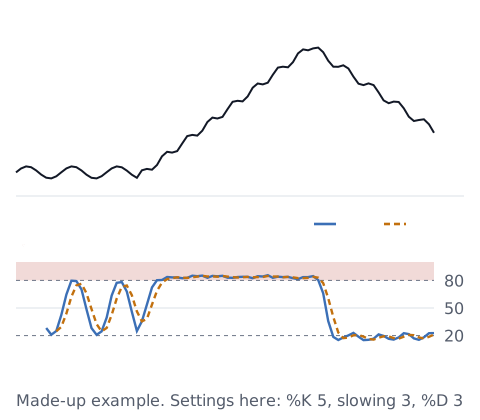
As in the chart, in a strong rise each close lands near the recent high, so the stochastic tends to stay above 80. In a strong fall, it tends to stay near or below 20. In a sideways market, it crosses the lines back and forth. Like other indicators, it is calculated from past prices and lags behind (see why indicators lag).
Check how you use it (you decide)
This article does not decide whether to use the stochastic, or which settings or lines to watch. If you use it, decide these first and log them, so you can see later how it worked for you:
- What you watch: crossing 80 or 20, coming back from them, or %K crossing %D
- When you watch: on closed bars only, or during the bar too
- How you log it: put the settings in the strategy name, like "Stoch 5/3/3"
The trading stats calculator turns a profit and loss list into win rate, average P&L and longest losing streak. With few trades, the numbers can change a lot. For other indicators, see MACD explained and Bollinger Bands explained.
Sources
- MetaQuotes. Stochastic Oscillator (MetaTrader 5 Help). https://www.metatrader5.com/en/terminal/help/indicators/oscillators/so
- MetaQuotes. Stochastic.mq5 (example code that comes with MetaTrader 5, in the MQL5\Indicators\Examples folder of the MT5 data folder)