What you will see
We go in this order. Every chart uses the same made-up price data (40 steps). It is not a real market. It is only an example to compare shapes.
- Candlesticks, bars and a line (the basic three, one mark per period of time)
- Heikin-Ashi (candles built from averages)
- What “not using time” means
- Renko (two charts with different settings)
- Three line break
- Kagi and point and figure
- What MT4/MT5 list
- Common misunderstandings
- A note on backtesting, and what to write in your journal
Candlesticks, bars and a line
These are the three basic types. Each mark is one period of time (15 minutes, 1 hour, 1 day and so on). Candlesticks and bars show four prices: open, high, low and close. A line joins the closing prices only.
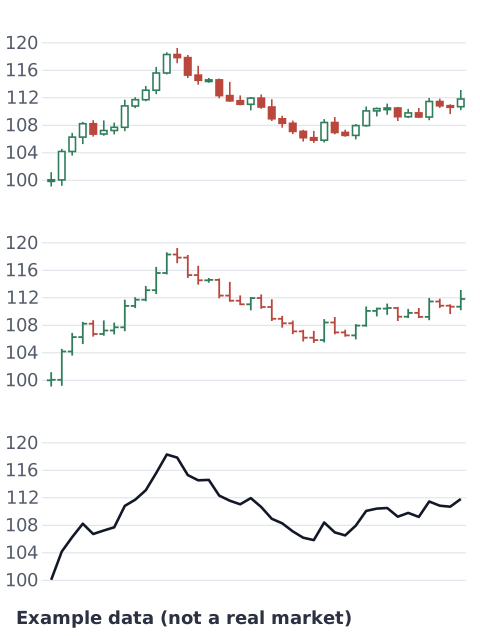
A candlestick draws a box (the body) between the open and the close, and thin lines (wicks) up to the high and down to the low. Here a rising candle is hollow and a falling candle is filled (colors depend on your platform settings). On a bar, the vertical line runs from low to high, the small tick on the left is the open and the small tick on the right is the close. The line uses closes only, so the highs and lows inside each period disappear and only the flow is left. For how to read candles, see How to read candlesticks.
Heikin-Ashi
Heikin-Ashi (Japanese for “average bar”) looks like a candlestick chart, but it does not use the four prices as they are. It draws candles from values calculated from averages. Because it is smoothed with the previous candles, its shapes and positions look different from normal candlesticks. The StockCharts guide gives these formulas:[2]
- HA close = (open + high + low + close) ÷ 4 of that period
- HA open = (previous HA open + previous HA close) ÷ 2
- HA high = the largest of the period’s high, HA open and HA close
- HA low = the smallest of the period’s low, HA open and HA close
Because each HA open comes from the previous HA candle, the earlier candles carry into the next ones. The same guide says the result “filters out some noise in an effort to better capture the trend.”[2]
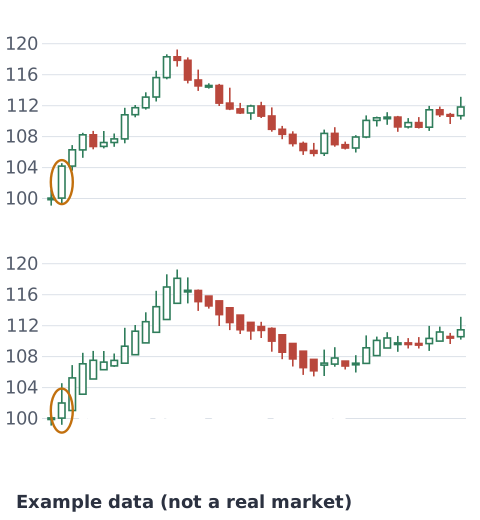
What you see: small ups and downs get smoothed out, so candles in the same direction tend to line up, as in the bottom chart.
The open, close, high and low of a Heikin-Ashi candle are calculated numbers, not prices that were traded. Look at the circled second candle. On the normal chart its close is 104.19. Its Heikin-Ashi close is 102.00 (calculated from open 100.06, high 104.57, low 99.19). If you place a stop-loss at the tip of a Heikin-Ashi candle, or read a fill price from it, you read a price that does not match the real market. Check real prices on a normal candlestick chart or a line.
What “not using time” means
So far, every mark was one period of time. The next four (Renko, three line break, Kagi, point and figure) are built from price moves only, not time. A new mark appears only when price moves by a set amount, or meets a set rule. If price barely moves, nothing is added. If it moves a lot, several marks can appear at once.
So the horizontal axis is the order the marks were made, not time. You cannot tell from the chart whether the next mark came a minute later or a day later. Small moves disappear and mainly the larger swings remain. From the same 40 steps, the number of marks changes a lot with the type and the settings. This is by design: each type adds marks under different conditions.
Renko
Renko adds one “brick” each time price moves by a chosen size (the box size). In the StockCharts guide, if the box is 10 points, a move of 10 points or more is needed before another brick is drawn, and smaller moves are ignored. Bricks form a staircase at 45 degrees.[3]
The way a reversal (up to down, or down to up) is handled differs a little between platforms. The charts here use this rule: on closing prices, price must move two boxes against the end of the last brick.
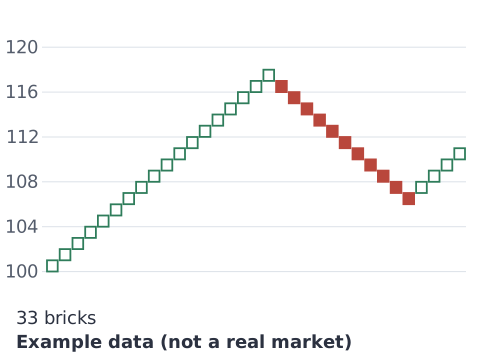
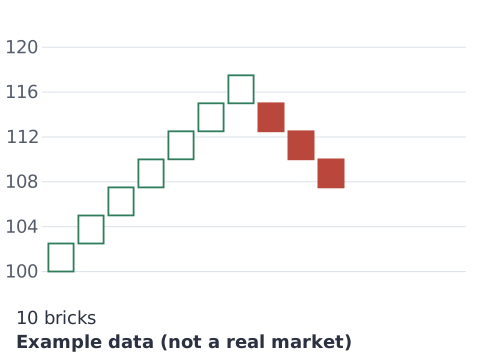
What you see: a small box picks up small moves, so you get many bricks. A large box hides small ups and downs and keeps only the big swings. The box size is a value the user chooses, and changing it alone changes how the same prices look. You can also set the box size from ATR (a measure of how much price moves). StockCharts warns that then the box size can change as data is added, and the chart can change a lot.[3]
Three line break
Three line break uses closing prices only. A white line is added when the close goes above the last line’s high, and a black line when it goes below the last line’s low. In the StockCharts guide, a reversal happens when a close goes beyond the high (or low) of the prior two lines the other way. Some books use the prior three lines instead, and the chart here uses that three-line rule. While price does not move enough, no line is added.[4]
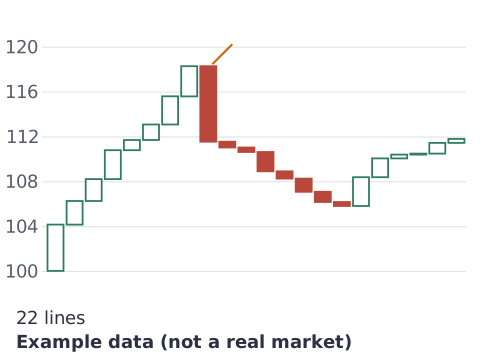
What you see: while price keeps rising, hollow lines climb like stairs. With this chart’s rule, when a close falls below the lows of the last three lines, one tall filled line appears and the direction changes. Where a new line starts can differ a little between platforms.
Kagi and point and figure
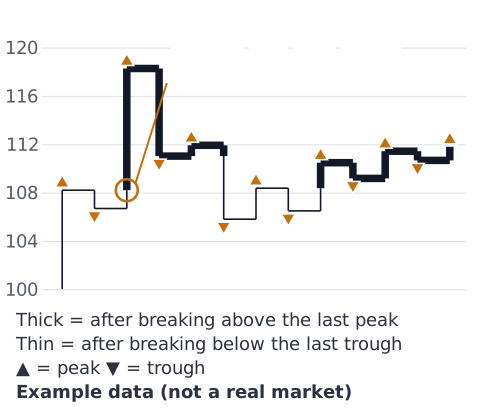
Kagi is one connected line that changes direction only when price moves against it by at least the reversal amount. The line is thick or thin. In the StockCharts guide, the line turns thick (yang) when it breaks above the previous peak, and thin (yin) when it breaks below the previous trough. The reversal amount can be set in points, percent or ATR.[5]
Point and figure (P&F) shows rises as columns of X and falls as columns of O. A new column starts when price moves against the current one by a set number of boxes (3 boxes in the StockCharts example).[6] There is no time scale on the horizontal axis. The box size and the reversal count are chosen by the user. The charts here use closing prices and a box of 0.5, and change only the reversal count.
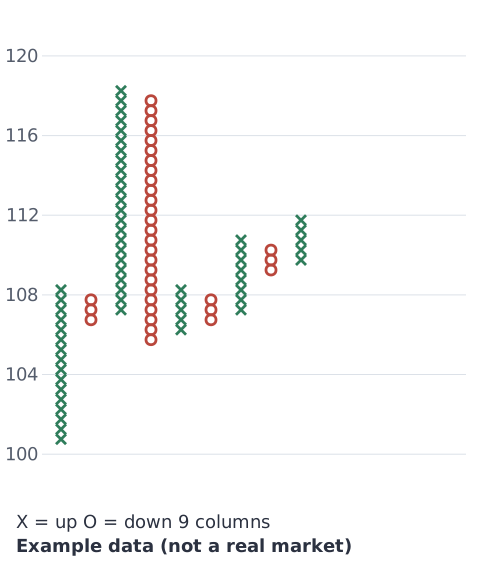
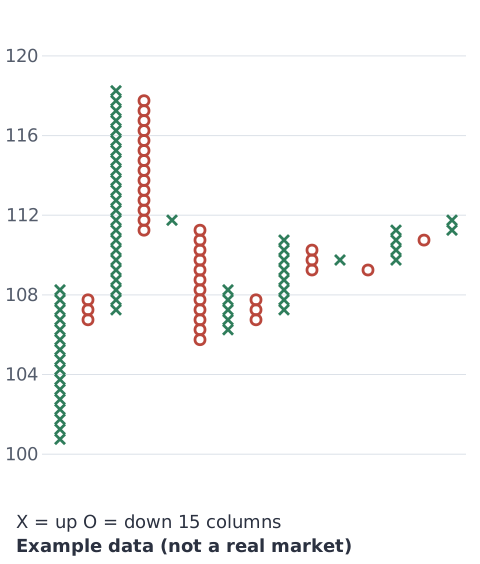
What you see: if the reversal needs fewer boxes, even a small move against the column starts a new one, so there are more columns. If it needs more, small moves are ignored and there are fewer columns. Kagi works the same way: a smaller reversal amount gives more lines, a larger one gives fewer.
What MT4/MT5 list
This section only says what we confirmed in MetaQuotes’ official help.
- MT5: the help says price charts can be shown as bars, Japanese candlesticks and a broken line.[1]
- MT4: the chart settings page lists three types: bar chart, candlesticks, and line chart (a broken line joining the closing prices).[7]
So the standard types the official help lists are candlesticks, bars and the line. Heikin-Ashi, Renko, three line break, Kagi and P&F did not appear on the help pages we checked. We could not confirm whether they are available as standard, or through add-on indicators. Please check the options in your own platform or your broker’s guide.
Common misunderstandings
You may see claims like these. We cannot say they are true.
- “Heikin-Ashi removes false signals.” It is built to smooth out some noise. The guide does not say false signals disappear.[2] Each candle carries over the previous average, but we have not checked whether it reacts later to price moves. These examples cannot show whether false signals go up or down.
- “Renko does not lag.” A brick appears only after price moves a full box, so small changes on the way are not shown. With the rule used in these charts, a reversal needs a move of two boxes. It is not built in a way that lets us say there is no lag.
- “Every chart has time on the horizontal axis, so they compare in the same way.” On types that do not use time, the horizontal axis is not time. Calculations such as moving averages use the sequence of marks too. StockCharts explains that a 10-period moving average on Renko uses the last 10 bricks, not the last 10 days.[3]
A note on backtesting
When you test a rule on past prices, the chart type can change the result.
- Do not count fills at Heikin-Ashi prices. They are not real prices. A test that assumes you traded at those values shows results at prices you could not have traded.
- Charts without time change shape with how they are built. Box size, reversal amount, and whether closes or highs and lows are used (you can choose this on Renko and Kagi) all change the shape. Small differences between platforms also show up in the results.
- The order inside a period is hard to see. With Heikin-Ashi and charts without time, it is hard to tell from the chart whether the high or the low came first inside one mark.
For measurement traps in general, see Backtest pitfalls.
Write down which chart you used
The same moment can look like “going up” on one chart and “stopped” on another. When you review later, if you do not know which chart type, and which time frame (or box size) you were looking at, you cannot rebuild that decision. In your trade notes, write something like “Candlestick 1h” or “Renko box 10 pips”. Later you can compare your own records. Your profit and loss list can be summarized with the trade history stats tool.
References
- MetaQuotes. Charts (MetaTrader 5 Help). https://www.metatrader5.com/en/terminal/help/charts_analysis/charts
- StockCharts ChartSchool. Heikin-Ashi Candlesticks. https://chartschool.stockcharts.com/table-of-contents/chart-analysis/chart-types/heikin-ashi
- StockCharts ChartSchool. Renko Charts. https://chartschool.stockcharts.com/table-of-contents/chart-analysis/chart-types/renko-charts
- StockCharts ChartSchool. Three Line Break Charts. https://chartschool.stockcharts.com/table-of-contents/chart-analysis/chart-types/three-line-break-charts
- StockCharts ChartSchool. Kagi Charts. https://chartschool.stockcharts.com/table-of-contents/chart-analysis/chart-types/kagi-charts
- StockCharts ChartSchool. Point and Figure Scaling and Timeframes. https://chartschool.stockcharts.com/table-of-contents/chart-analysis/point-and-figure-charts/point-and-figure-basics/point-and-figure-scaling-and-timeframes
- MetaQuotes. Charts Setup (MetaTrader 4 Help). https://www.metatrader4.com/en/trading-platform/help/chart_management/charts_setup